
Minute Notes Template
Formal minutes record what a board, committee, club or association decided — not everything that was said. This template walks you through each section in the standard order, records motions, vote counts and discussion notes for review. It does not determine legal validity or approve a decision; confirm the outcome under your organisation’s rules. Download them as a Word-compatible file or plain text, or print.
- Free to use
- No sign-up
- Runs in your browser
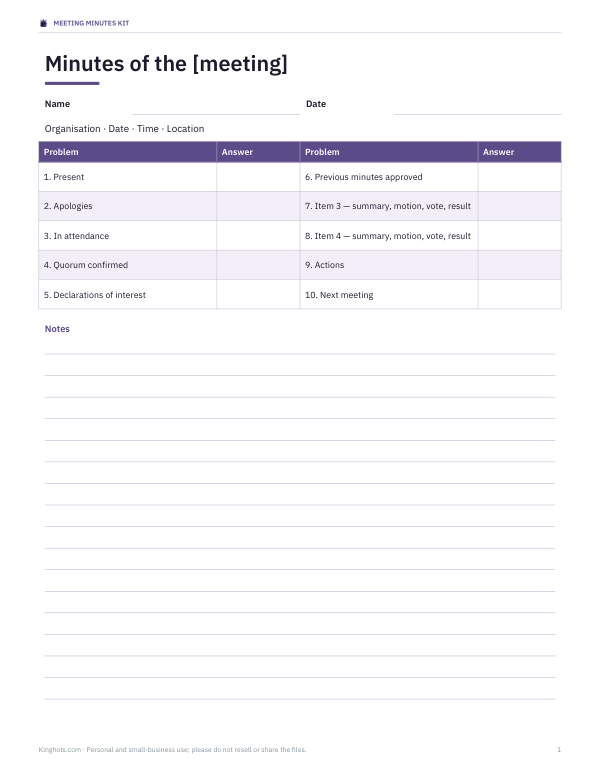
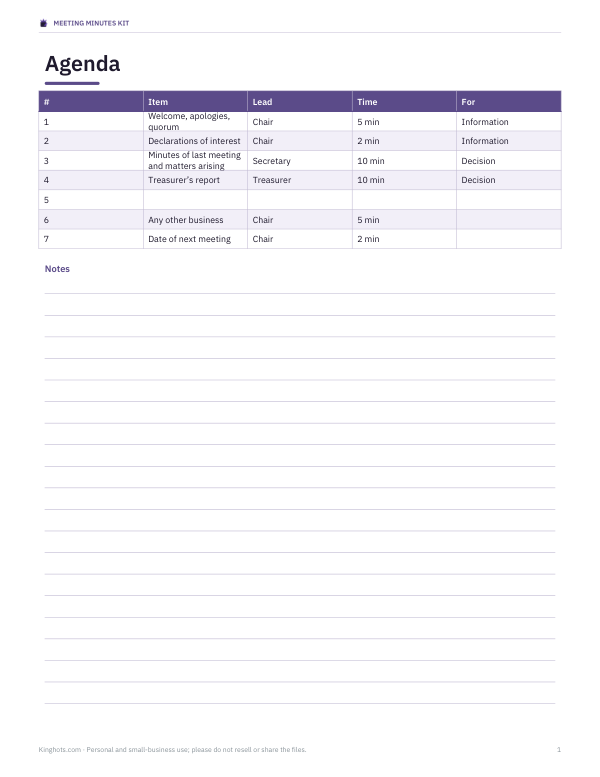
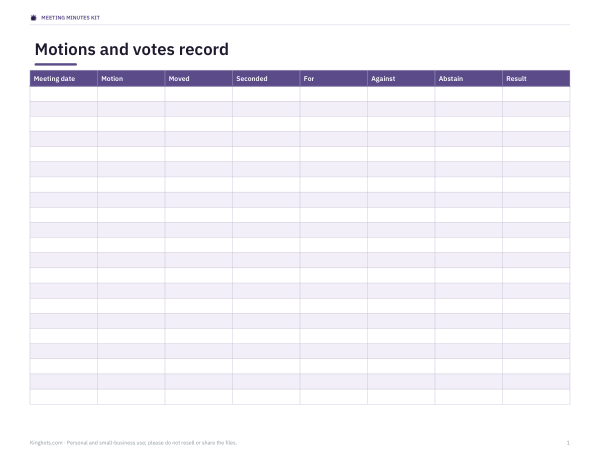
Meeting minutes template
Agenda items
Meeting Minutes Kit
All five PDFs are free. The $3 kit adds three editable DOCX templates, two XLSX logs and an offline bundle for preparing and reviewing meeting records. The form does not certify decisions or legal compliance.
- Minutes template (DOCX/PDF)
- Agenda (DOCX/PDF)
- Motion record
- Action log (XLSX)
- Attendance register
Formats: PDF, DOCX, XLSX. Instant download after payment (link valid 72 hours, up to 5 downloads). AI-assisted: AI tools were used to help draft these materials.
$3.00 USD, one-time
- Instant download
- 7-day refund
- Secure checkout by Stripe
7-day money-back guarantee. Full refund within 7 days of purchase, even after you download.
Full refund within 7 days — see the refund policy and license.
Free printables
Single sheets you can print right now, no sign-up. The full pack adds every sheet in one download plus the editable files.
 Printable Action Log Template
 Printable Attendance Register
Scope and governing rules
This is a general drafting aid. Eligibility, quorum and voting thresholds depend on your organisation and jurisdiction. For an example scoped to charities in England and Wales, see Charity Commission meeting guidance. It is not a universal rulebook or a compliance certification.
What minutes are for
Minutes are the official record of a meeting. Their job is to show what was decided, who is responsible for what, and that the meeting was properly constituted — not to transcribe every comment. Good minutes protect the organisation: they show that decisions were made with a quorum, that conflicts of interest were declared, and what the vote was. For companies, charities and many associations, keeping minutes is a legal or constitutional requirement.
The standard order of formal minutes
- Name of the organisation, type of meeting, date, time and place.
- Attendance: members present, apologies and others in attendance.
- Opening and confirmation that the meeting is quorate.
- Declarations of interest, if your rules require them.
- Approval of the minutes of the previous meeting and matters arising.
- Each agenda item: a short summary, any motion and the result.
- Action items with owners and deadlines.
- Any other business, date of the next meeting and closing time.
- Space for the chair to sign once the minutes are approved.
Recording motions and votes
| Part | Example |
|---|---|
| Motion | To hire the marquee from the lower quote at up to £450. |
| Moved by | R. Okafor |
| Seconded by | T. Brown |
| Vote | 4 for, 1 against, 1 abstention |
| Recorded outcome | Enter the chair’s confirmed decision after checking your rules |
Write the motion exactly as it was voted on. Many organisations don’t record the names of how individuals voted unless someone asks for their vote to be recorded. The tool records counts without deciding whether a motion passed. It supports one vote per listed person, without proxy or weighted votes. Use Recorded outcome to enter the chair’s confirmed decision after checking eligibility, quorum and the voting threshold in your rules. The entered outcome is a record, not a validation by this tool.
How to use the template
- Fill in the meeting details, the chair and the minute-taker.
- List members present, apologies and non-members in attendance, one per line.
- Enter the quorum from your governing rules; the form compares the attendance count only.
- Add each agenda item with a brief summary, any motion and the vote, and any action.
- Check the formatted minutes in the preview, then download a Word-compatible .rtf, a text file, or print.
Valid agenda items are saved as a draft in this browser. Meeting details and attendance are not saved; re-enter them when you return. Nothing is uploaded.
Worked example
In the example, six people are listed and the stated quorum is five. The form shows the entered vote counts of 6–0–0 and 4–1–1, but leaves each outcome unconfirmed. The minute-taker must check eligibility, quorum at the decision, and the applicable threshold, then enter the chair’s confirmed outcome. The action owner and deadline remain separate from that outcome. Review and approve the draft under your organisation’s rules before signing it.
Tips for the minute-taker
- Get the agenda and previous minutes before the meeting.
- Write in the past tense and third person: “The committee agreed…”.
- Record decisions and reasons briefly, not a play-by-play of the discussion.
- Ask the chair to restate a motion if it isn’t clear before the vote.
- Note when anyone arrives late or leaves early if it affects the quorum.
- Write up the minutes within a day or two while memories are fresh.
- Circulate a draft to the chair before sending to all members.
Approving minutes
Minutes become the official record once the next meeting approves them — usually by a simple motion that they are “a true and accurate record”. Corrections are made at that point and noted in the new minutes. The chair then signs and dates the approved copy, which is kept with the organisation’s records. Many organisations keep minutes permanently; check your constitution and any legal requirements where you are.
Minutes for different organisations
Company board minutes must meet company law and often record directors’ declarations of interest and formal resolutions. Charity trustees need to show they acted in the charity’s interests. Clubs, parent-teacher associations and residents’ groups follow their own constitution, which usually sets the quorum and voting rules. The same basic structure works for all of them; adjust the headings to match your rules.
Action items that get done
An action item should say who will do what, and by when: “J. Morgan to book the marquee by 30 October”. Collect the actions at the end of the minutes or in a separate action log, and review them as a standing item at the start of the next meeting. The pack includes an action log workbook for tracking them between meetings.
Frequently asked questions
What should be included in meeting minutes?
Date, attendance, quorum, approval of previous minutes, decisions and motions with votes, action items and the next meeting date.
How do you record a motion in minutes?
Write the motion as voted, who moved and seconded it, the vote count and whether it was carried.
Should minutes record everything said?
No, just a brief summary, the decisions and the actions.
Can I download the minutes as a Word file?
Yes, as a Word-compatible .rtf, or as plain text.
Is my draft saved?
Valid agenda items are saved in this browser until you clear them. Meeting details and attendance are not saved.
Who signs the minutes?
Usually the chair, once the next meeting has approved them.
How soon should minutes be circulated?
Ideally within a few days, as a draft checked by the chair.
What is a quorum?
The minimum number of members who must be present for decisions to be valid, set by your rules.